
Practical use case: Driving clamps


"A clamp in robotics is an end-effector (or "tool") attached to the end of a robotic arm, designed to firmly grasp, hold, or manipulate an object during a task. They act as the "hands" of the robot and are widely used in manufacturing, packaging, and machining."
Different clamp types exist based on their power source - pneumatic, electric etc.
In Process Simulate clamps are modelled as devices. They have logic that drives their joints based on the state of their inputs. Usually this means putting the device in a particular pose or controlling individual joints. Motion profiles are used to ensure smooth motion - just like in reality.
In Practical use case: Implementing MJV using a script I have already presented how to apply a motion profile to a joint. The same concept applies here.
The script for the clamp is specific to the clamp type. Here is a possible script for a rotary clamp with a single primary joint:
FUNCTION_BLOCK "ClampControl"
VAR_INPUT
    Clamp : BOOL;   		// Close clamp
    Unclamp : BOOL;  		// Open clamp
END_VAR
VAR_OUTPUT
    Clamped : BOOL;   		// Status
    Unclamped : BOOL;   	// Status
END_VAR
VAR
	mjv : "MOVE_JOINT_TO_VALUE_SCP";
END_VAR
VAR CONSTANT
	acc : LREAL := 0.01;		// rad/s
	velocity : LREAL := 0.1;	// rad/s
	j1MaxValue : LREAL := 1.5707963268; // 90 deg
	j1MinValue : LREAL := 0;	// 0 deg
END_VAR
BEGIN
// Status
#Clamped := ABS(JDS('j1')-#j1MinValue) < 0.01;
#Unclamped := ABS(JDS('j1')-#j1MaxValue) < 0.01;

// Close Clamp
IF #Clamp AND NOT #Clamped THEN
	#mjv(joint:='j1',
	     acc:=#acc,
	     velocity:=#velocity,
	     target:=#j1MinValue);
END_IF;

// Open Clamp
IF #Unclamp AND NOT #Unclamped THEN
	#mjv(joint:='j1',
	     acc:=#acc,
	     velocity:=#velocity,
	     target:=#j1MaxValue);
END_IF;

END_FUNCTION_BLOCK
Save this script in a UTF8 encoded ClampControl.scl text file and import it. Then use it like any other FB. Of course the scripts for the MJV should be imported as well.
The main script looks like this:
FUNCTION_BLOCK "MAIN"
VERSION:1.0
VAR_INPUT
	open : BOOL;
	close : BOOL;
END_VAR
VAR_OUTPUT
	opened : BOOL;
	closed : BOOL;
END_VAR
VAR
	clamp : "ClampControl";
END_VAR
BEGIN
	#clamp(Clamp:=#close,
		Unclamp:=#open,
		Clamped=>#closed,
		Unclamped=>#opened);
END_FUNCTION_BLOCK
Paste the script in the SCL editor, wire the signals to the inputs and outputs and run the simulation. The clamp works. It moves from open to close position using the trapezoid motion profile.
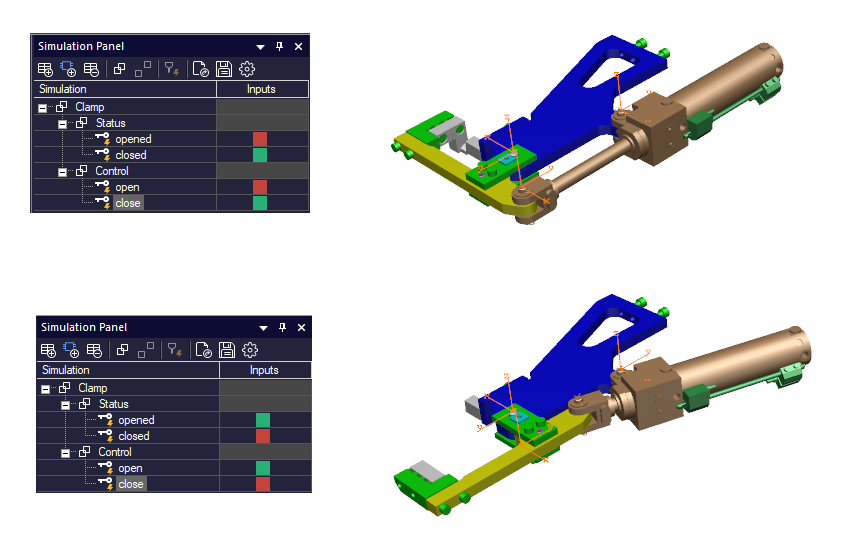
The same approach can be applied to fixtures, grippers or any other clamping device. Just create a specific script for each use case. A good practice would be to name the script after the clamp type. Store the scripts and reuse them. Once you have a library of scripts, writing code becomes easier.
You can use AI to generate a different motion profile (if you need one) and simply change one script with another ...
Enjoy!


Comments