
Velocity sensor (Release)

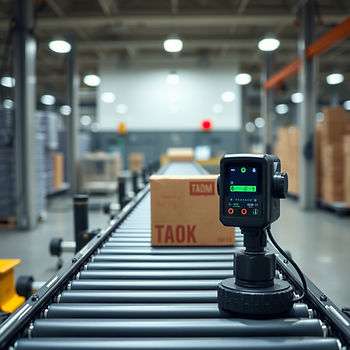
The part velocity sensor (Practical use case: Velocity sensor (PoC)) is available in version 2606 EAP. Similarly to the distance sensor now there is a function block that encapsulates the behavior. The inner logic stays pretty much the same. It detects changes in the minimal distance from the sensor to the part and then calculates its velocity.
It builds on top of the distance sensor (Distance sensor (Release)) as you might expect. And just like the distance sensor there is a SCL template that shows the usage.
Here is how it looks:
FUNCTION_BLOCK "MAIN"
VERSION:1.0
VAR_INPUT
	part : TX_OBJECT; 		// part picker
	range : LREAL := 1350; 	// range (mm)
	fov : LREAL := 90; 		// field of view (deg)
	axis : INT := 0; 			// Z axis is used by default (0=X,1=Y,2=Z)
END_VAR
VAR_OUTPUT
	velocity : LREAL; 		// measured velocity (mm/s)
END_VAR
VAR
	sensor : "PART_VELOCITY_SENSOR";
END_VAR
BEGIN
	// call the sensor
	#sensor(PART:=#part.NAME,
		AXIS:=#axis,
		FOV:=#fov,
		RANGE:=#range,
		TIMEOUT:=T#5s,
		VELOCITY=>#velocity);
END_FUNCTION_BLOCK
Usage is simple. You provide the inputs and it gives you the output in mm/s. In the case of a positive velocity the part moves towards the sensor. In the case of a negative velocity the part moves away from the sensor.
The arguments are very similar to the ones of the distance sensor. Part name, detection axis, field of view, range and a timeout.
Why do we need the timeout?
It helps you smooth out the velocity readings when the part jumps instead of moving continuously. In this case the last detected velocity is reported for the period of the timeout. Once the timeout period elapses the velocity is reset to zero. A timeout value of zero will always return the current velocity.
Now let's mention some of the limitations:
1. The sensor is expected to be used with linear motion only. Any non-linear motion will give you inaccurate results.
2. Geometry is mandatory.
3. Performance depends on the performance of the distance sensor.
4. For now we cannot visualize the sensor's range and field of view.
I guess this wraps things up.
Try it yourself!


Comments